You can ask Geminel a question about your business and get an answer that comes from your own sources: your documents, your pages, your published posts and your media. It is a quick way to check what Geminel knows before it writes for you.
Ask a question
- Open the launcher and press Knowledge.
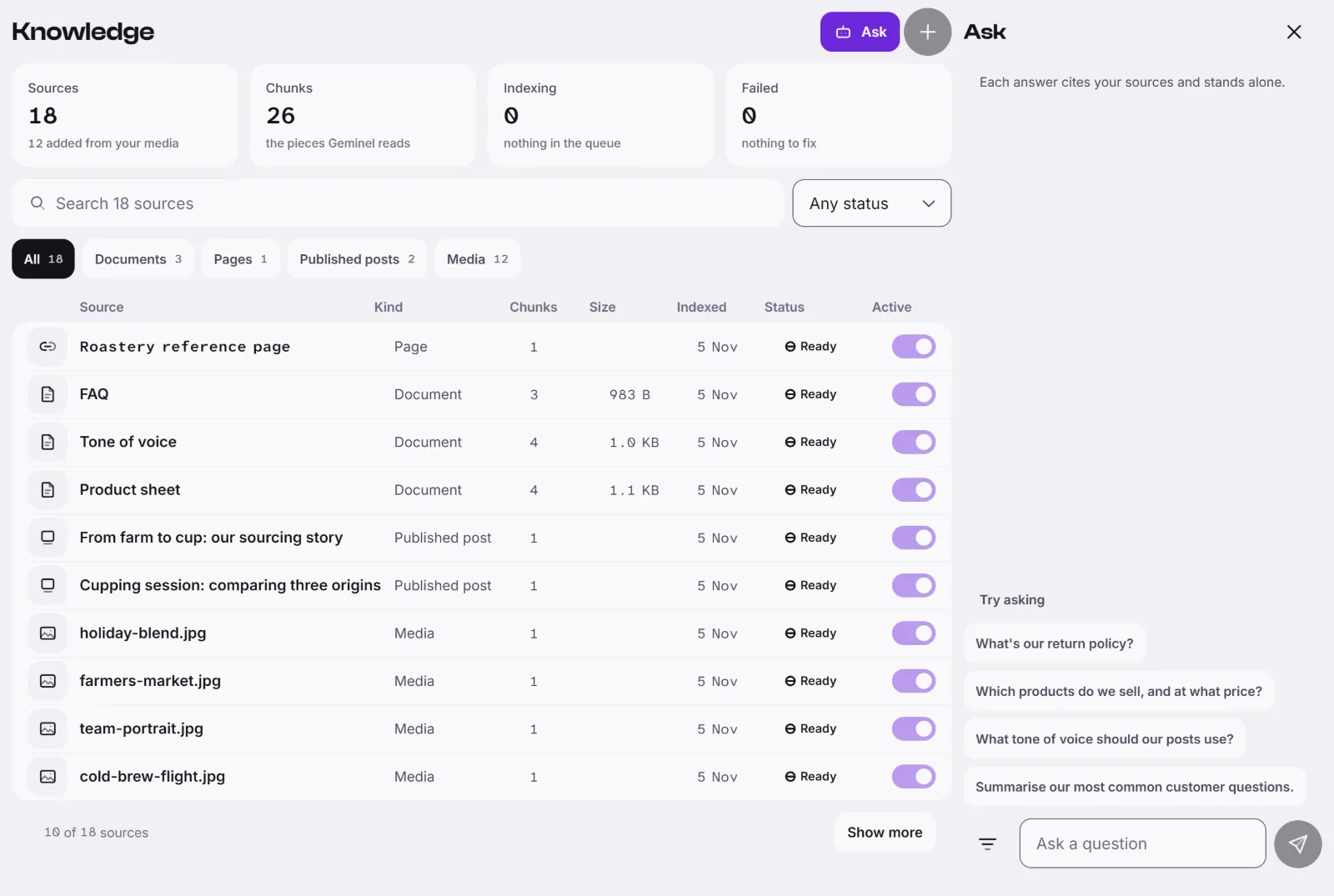
- Press Ask. On a wide screen a panel called Ask opens beside the list; on a phone it opens as its own screen.
- Type in the box marked Ask a question and press Enter, or press Send the question. Shift and Enter start a new line. You can also press one of the suggestions under Try asking.
- Read the answer. Small numbers in the text point to the sources, and under the answer you see From and the sources it used. Press one to open it.
Look in only some sources
Beside the box, the filter button is named Search in. Choose All, or tick one or more kinds: Document, Page, Published post or Media. An answer you asked with a filter says Limited to and the kinds.
Good to know
- Each question is answered on its own. Geminel does not remember your earlier questions, so put what it needs in each one. The refresh button in the panel starts a clean list.
- If you see "Nothing in your sources matched. This answer comes from the model alone.", the answer is not built from your sources. Treat it with care, or ask us to add the source: see What Geminel knows about your business.
- Asking can show a cost next to the box. Where to see what things cost: Credits.
- If an answer fails, press Try again.
- If you don't see Knowledge, ask us with Help and feedback.