Geminel writes from what it knows about your business: your documents, your web pages, your published posts and your media. The Knowledge screen shows all of it and what Geminel read from each source. Our team adds and removes sources for you; you can look at everything and ask questions.
What you see
- Open the launcher and press Knowledge.
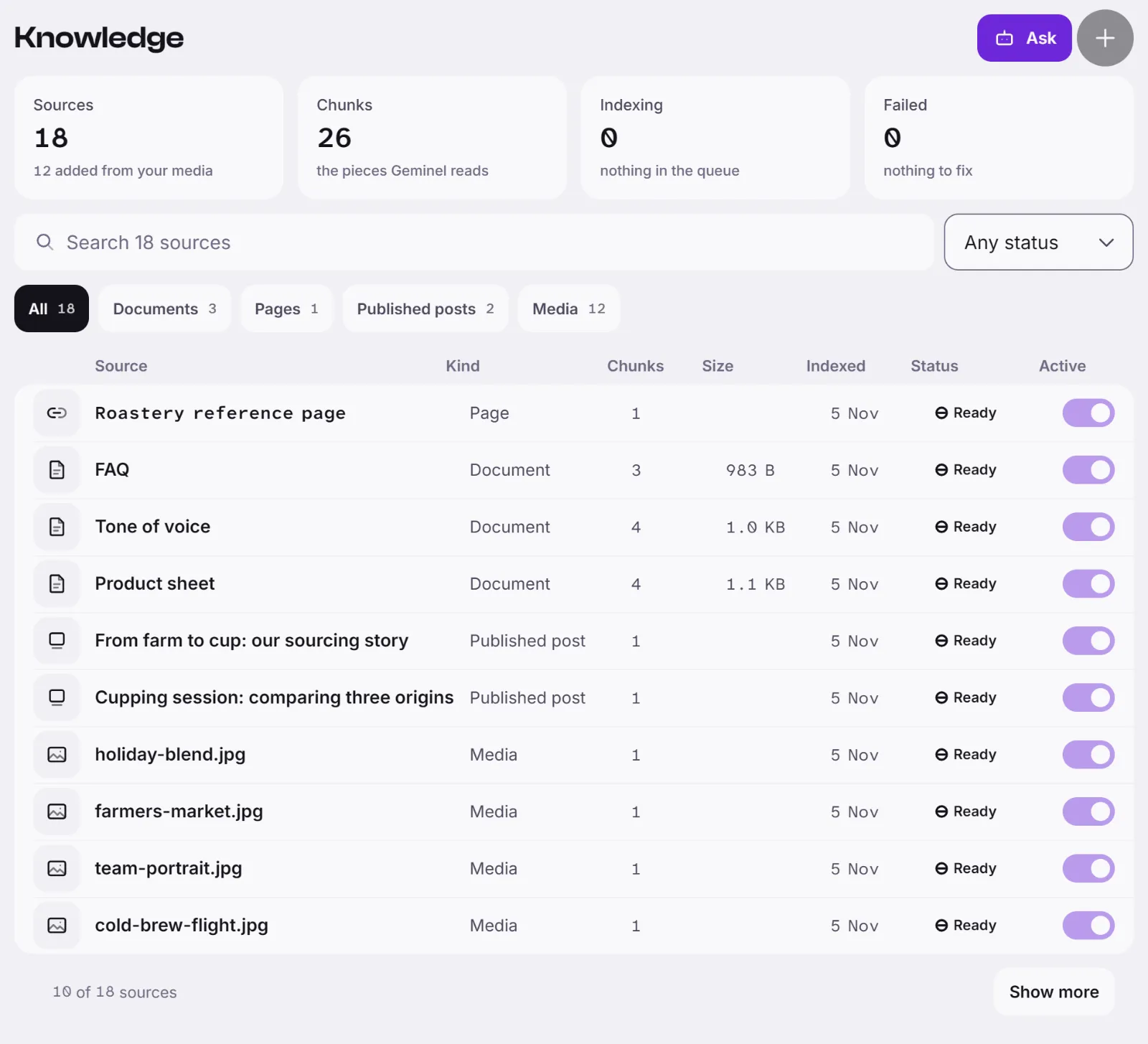
- At the top, Sources, Chunks, Indexing and Failed summarise the library. A chunk is one piece of text Geminel reads.
- Search the list, filter it by Any status, or filter by kind: Documents, Pages, Published posts or Media. The columns are Kind, Chunks, Size, Indexed and Status.
- Press a source to open it. You see whether it is Active or Not used, its tags, and the number of chunks. Under What Geminel read, press the chunks row to read the pieces, or Text preview for the text as Geminel read it.
A source's Status is Queued, Indexing, Ready, Failed or Skipped. If a source is Failed, filter by Failed and tell us which one.
Posts and media
Published posts and the media in your library are added to Geminel's knowledge by themselves, and they are re-indexed automatically. You do not add them.
Good to know
- The Active switch on a source, Add source, Index again and Delete are for our team. You can see them but not press them; the screen says only a general admin or manager can add sources.
- A scanned, image-only PDF may be read only in part, because Geminel does not read the text in pictures. A source marked Scanned may be like this.
- To test what Geminel knows, see Ask your knowledge base.
- If you don't see Knowledge, ask us with Help and feedback.
Ask us
- Open Help and feedback: the chat icon at the foot of the launcher in the app or in the console, or the Help and feedback row on your Profile.
- Choose Ask a question and write what you want: add a source, turn one off, or remove one.
- For a document, say which one; we take PDF, DOCX, TXT, Markdown or HTML. For a page, send its public web address.
- We add or change the source and tell you when it shows as Ready on Knowledge.
If you don't see Help and feedback, tell us in the way you usually reach us.