Autonomy decides how much Geminel does on its own and where it waits for you. You set it once per content type, and every choice saves at once.
Open Autonomy
- Press the round mark in the dock to open the launcher, then press Settings.
- Press Autonomy.
Anyone in the workspace can read this screen. If you see Read-only for your role. Anyone who can approve posts can change it., ask someone who can approve posts to change it.
Choose how posts are approved
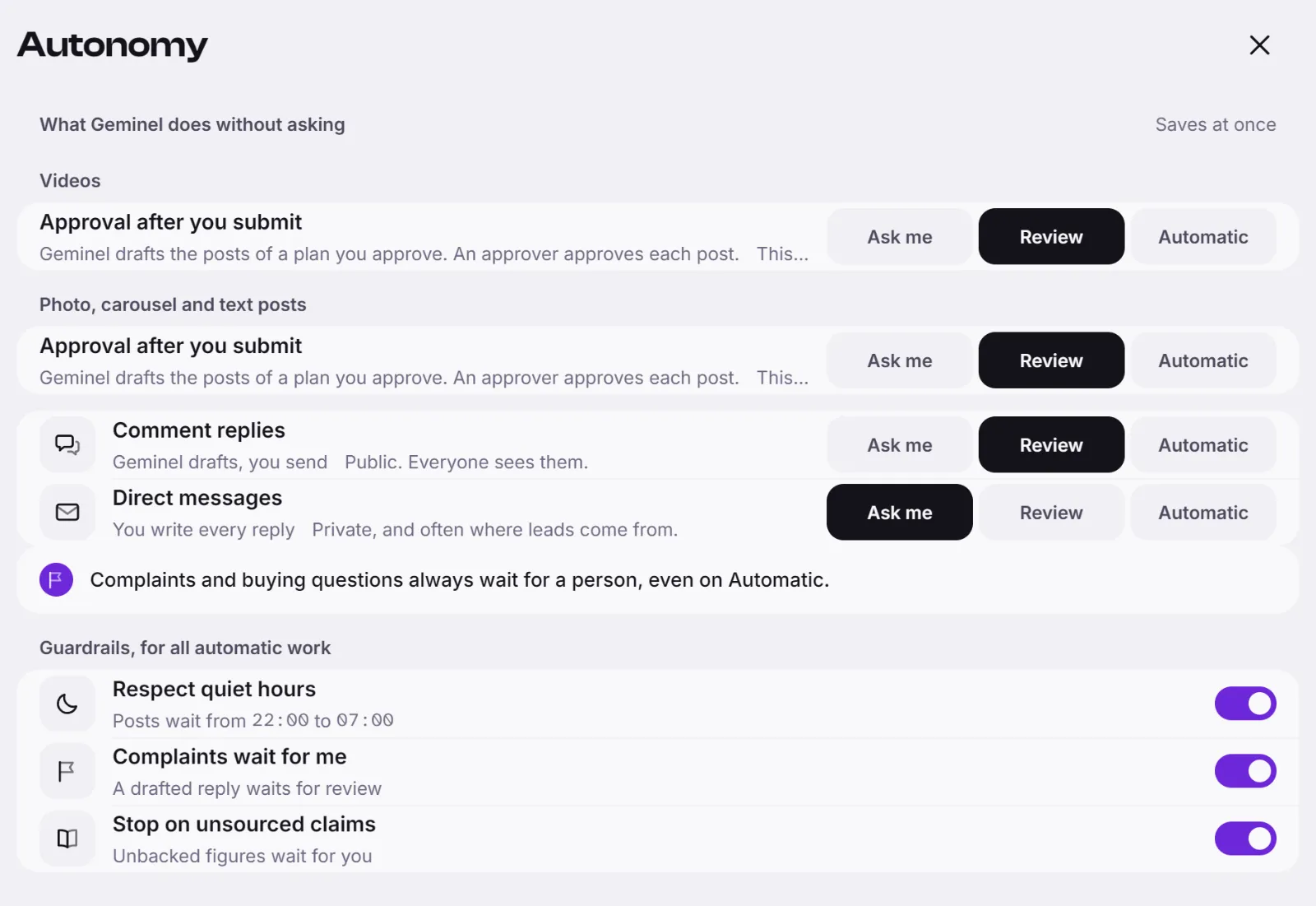
Under What Geminel does without asking, Videos and Photo, carousel and text posts each have Approval after you submit, with three choices:
- Ask me: the planner only proposes. Nothing is drafted until you start it, and an approver approves each post.
- Review: Geminel drafts the posts of a plan you approve. An approver still approves each post.
- Automatic: your Submit for review is enough. Geminel approves once its checks pass.
This is only about approval. A person still schedules the post: see Approve, schedule and publish.
Choose where the video team stops
When it is offered to your workspace, Where the team stops while making it appears above the approval choice:
- Every step: you check the plan, the voice and the edit, then the finished piece.
- Plan and result: you OK the plan, then the finished piece.
- Result only: the team makes it end to end, and you check the finished piece.
- Follow my approval level: the stops follow the choice above.
The strip underneath shows each stop (Plan, Voice, Edit, Result, Approval, Schedule) with you or team under it. The Result stop is always yours. To learn what the team does, see Your video team.
Choose how replies go out
Comment replies and Direct messages each have Ask me (you write every reply), Review (Geminel drafts, you send) and Automatic (automatic where a rule allows it). Complaints and buying questions always wait for a person, even on Automatic. See Automatic replies and Answer comments and messages.
Turn on the guardrails
Guardrails, for all automatic work has three switches: Respect quiet hours (automatic posts wait when they would go out inside the workspace quiet hours), Complaints wait for me and Stop on unsourced claims. On a phone they sit under Guardrails.
Good to know
- After you approve a run of posts of one kind unchanged, Geminel offers Turn on Automatic. Press Not yet to be asked again later.
- Finish for me lets the team also submit, approve and schedule what it makes, as your approval given in advance. A client member of the workspace confirms it with Turn on, and an approver can turn it off. You are told, and can undo until it goes out.
- If you don't see Where the team stops while making it or Finish for me, or the latter is off with a reason, ask us with Help and feedback.
- A post that fails a guardrail still waits for a person, whatever its level.
- Where your workspace shows what automatic work costs, the figure sits beside it. For credits in general, see Credits.